OVERVIEW
As part of a 6-week design sprint, I collaborated with two peers to create IndyTrails, a city-wide wayfinding experience. Our goal was to transform fragmented navigation into a unified system that connects people with places, and with each other, through kiosks, mobile flows, and community-powered content.
Team: 3 UX Designers
Timeline: 6 weeks
Role: UX Research, Ideation, Wireframing, Testing, UX Writing
Tools: Figma, Paper Sketching, Google Docs
THE PROBLEM
Downtown Indianapolis is lively and full of character, but navigating it isn’t always easy. Whether you're a local, a day-tripper, or a first-time visitor, finding the right places or even the right direction can be frustrating.
WHERE WE STARTED
We kicked things off by looking at existing solutions in other cities, things like printed maps, Houston’s IKE smart kiosks, and community-based apps. They helped us understand what works (and what doesn’t).
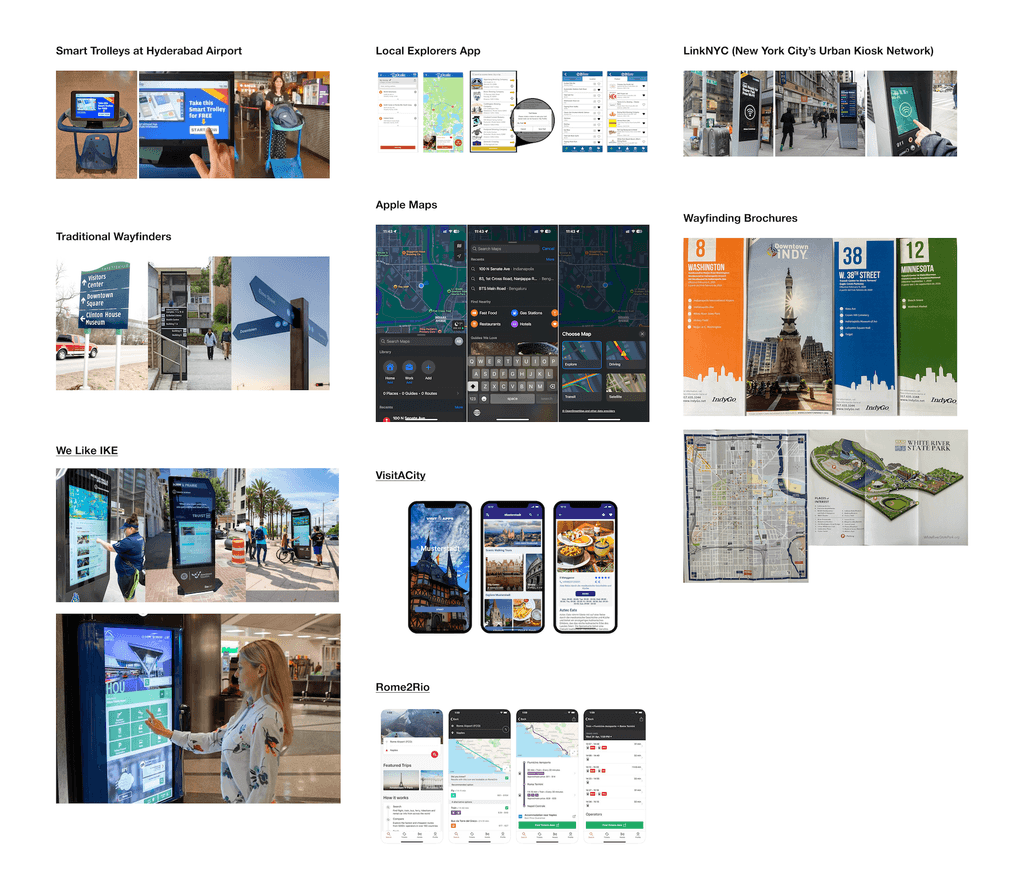
To understand the landscape better, we began with an extensive secondary research phase, pulling insights from:
Travel blogs like Lonely Planet and The Travel
News sites like Axios Indianapolis
City websites like IndyGo, Pacers Bikeshare
Urban infrastructure and planning reports
Behavioral Insights
People prefer digital maps over physical signage
Kiosks are underused unless placed in high-traffic or tourist zones
Users trust community platforms like Reddit over curated apps
Walking infrastructure is weak; biking and driving dominate
User Preferences
Real-time transit and route updates are a must
Multimodal navigation (bike, walk, public transit) is expected
Users want fewer apps, they value centralized, low-effort tools
There’s growing interest in systems that mix maps with community voices
GETTING OUT THERE: USER RESEARCH
To learn from real people, we interviewed 7 users - locals, students, and first-time visitors. We also went on foot, walking through downtown to observe signage and user behavior.
What we heard:
“I mostly use Reddit to find cool places.”
“Maps are helpful, but I never know which way to start walking.”
“I don’t trust kiosks. They feel outdated.”
Add pictures from our outing
Key insights: (based on maybe the insights gained after affinity mapping, or key themes something like that)
Visitors feel lost and overwhelmed by unclear signage
Locals want smarter biking routes, not just generic maps
People often don’t notice kiosks unless they stand out or are interactive
Everyone wanted a way to save or share their journey
PEOPLE FIRST: OUR THREE PERSONAS
Could make it like a carousel like 3 tabs with names and a side arrow to show the next persona like images
Based on research, we created three personas to represent our key user groups:
🧑🦱 Jordan — The Local Navigator
Delivery rider who avoids apps, but craves clearer biking routes and updates.
🧑💻 Karthik — The Day Tripper
Explores via Reddit threads, trusts real opinions, and loves finding hidden gems.
🧕 Riya — The Visitor
Needs efficiency and clarity. Expects mobile-first tools with intuitive navigation.
DEFINING THE PROBLEM
We created three personas to guide our design decisions:
We mapped their pain points, needs, and behaviors to ensure our system worked for everyone—not just one type of user.
SKETCHING AND & BRAINSTORMING
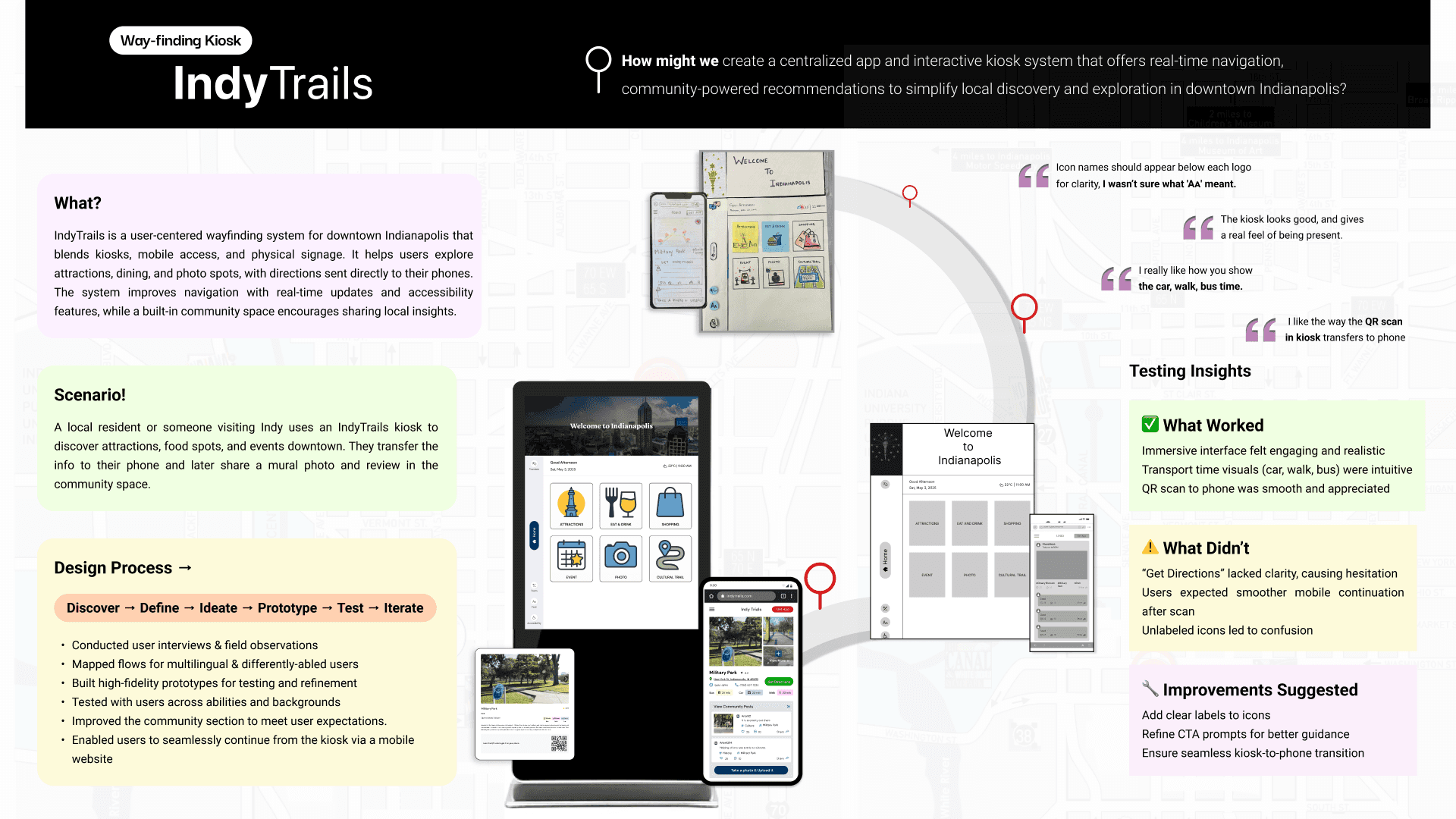
We each started with sketches - different ideas for how the kiosk and mobile site might look or work. In a fun group session, we mixed our ideas and landed on a hybrid solution: a kiosk to get people started, and a mobile experience to keep them going.
To visualize it, we made:
A user journey map (based on Riya’s story)
A storyboard of her experience
Flow diagrams for both kiosk and mobile use
We started with individual sketches—each team member pitched their take on the solution. Some included event-focused screens, others had personalized itineraries or photo sharing.
Then we came together to brainstorm and combine ideas. We chose the strongest elements and refined them collaboratively:
Riya’s journey became our main storyboard
Jordan’s needs influenced kiosk placement and bike path clarity
Karthik’s habits inspired our community-based content space
🧠 We used:
Affinity mapping to cluster problems
User journey mapping to visualize Riya’s day
Flow diagrams to map out kiosk and mobile paths
Design decisions to split interactions across kiosk vs mobile, intentionally
This creative phase helped us make sense of complexity and build a coherent, inclusive system.
DESIGN DECISIONS
We made intentional choices:
Why a website, not an app?
No downloads = less friction.
Why both kiosk and mobile?
One starts the journey, the other continues it.
Why a community section?
Real stories build trust better than star ratings.
We prioritized accessibility, added multilingual support, and kept the UI playful and simple.
BUILDING & TESTING
📝 Paper Prototypes
We mocked up both kiosk and mobile views on paper and tested them in the wild.
Takeaways:
Users loved the QR-to-phone handoff
Icons needed labels
“Get Directions” wasn’t clear enough
💻 Mid-Fidelity Prototypes
Next, we built mid-fi designs and tested again.
Takeaways:
Community section felt incomplete
Card overlays were too small
Visual hierarchy needed work
🎨 High-Fidelity Prototypes
We improved layouts, added scroll, made icons clearer, and brought in user-generated features like uploading photos and reviews.
We started with low-fidelity sketches for both kiosk and mobile. Our two main kiosk flows:
Card-Picking Interaction — a surprise-based discovery system
Category Browsing — for users with specific interests
We also sketched a mobile flow triggered by scanning a QR code from the kiosk. It would show directions, and later prompt users to post a photo or review.
📋 Testing Round 1
We tested these flows with real users downtown.
🗨️ Feedback:
Loved the card-picking surprise
Wanted better icon labels
“Get Directions” felt vague
Mobile flow felt incomplete
🖥️ Mid-Fidelity Prototypes
We incorporated user feedback:
Added icon labels
Improved visual hierarchy
Began building out the community sharing feature
📋 Testing Round 2 surfaced:
Users wanted scrollability
Overlay cards were too small
Community section was too hidden
✨ High-Fidelity Design
The final version included:
Clear CTAs ("Get Directions", "Save", "Share")
A full community section on mobile with real-time user uploads
Ability to post photos, tag locations, or even post anonymously
Accessibility adjustments: large tap targets, high contrast, multi-language support
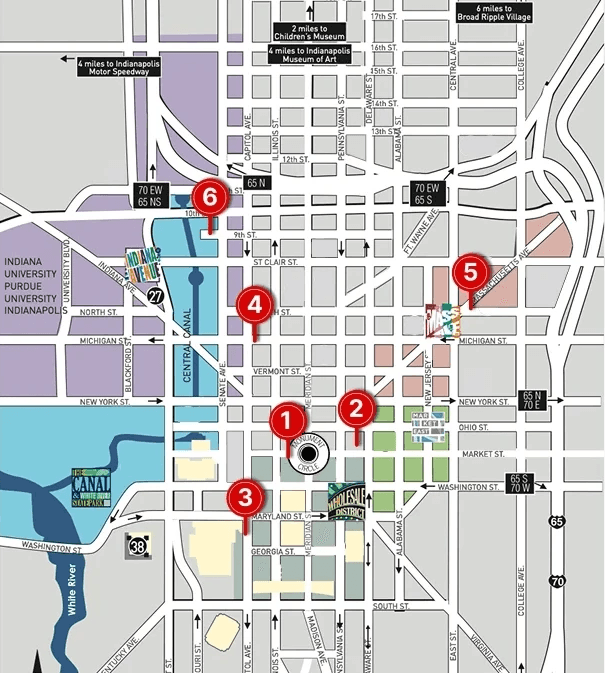
📍Kiosk Placement Strategy
We chose 6 strategic kiosk locations based on:
Foot traffic
Nearby attractions
Hotel & retail proximity
Bike paths and event spaces
📍Examples:
Monument Circle (central hub)
Mass Ave (food & arts)
Hilton Hotel (for tourists)
Canal Walk (family-friendly zone)
Each location was chosen to enhance natural wayfinding without disrupting flow.
WHERE WOULD THESE KIOSKS GO?
We mapped out 6 ideal kiosk locations, from tourist hotspots like Monument Circle to local-favorite hangouts like Mass Ave and the Canal Walk.
Monument Circle - A central landmark with high foot traffic, an ideal anchor for citywide orientation
Hilton Hotel - Assist travelers as they step out of the hotel and start exploring the city.
Near Downtown Museums - This helps tourists navigate between major museums and nearby park areas.
Kroger, W Michigan St - Useful for nearby residents and students to explore Indy Downtown
Condado Tacos, Mass Ave - In the heart of a lively arts and food district, guides users to dining & nightlife spots.
Indianapolis Colts Canal Playspace - Perfect for families and walkers in the Canal Walk area
REFLECTION
Designing for both digital and physical environments was a challenge, but it made the project so rewarding. We had to consider how people move, discover, and make decisions in real time.
Talking to people downtown helped us empathize with their confusion, habits, and hopes. One memorable quote came from someone who said “I’d trust a system more if it felt like Reddit.” That comment led us to design the community space, a small shift that made the whole experience feel more personal, social, and alive.
A big breakthrough came during a group ideation session where we finally saw the vision click. It felt organic, collaborative, and grounded in everything we had learned.
WHAT I LEARNED
Good design is more than what looks nice—it’s about what feels right in the moment.
Designing for real people in real places means thinking beyond screens.
Listening to feedback at every stage helped us evolve faster, and better.
NEXT STEPS
Final user testing with more diverse groups
Plan for kiosk hardware (ADA compliance, durability)
Expand mobile flows for things like events, routes, and safety
Explore city partnerships for implementation